
Last updated: June 17, 2026
Quick Answer: The Rove Miles shopping portal and Chrome extension are worth installing for most online shoppers who already use a travel rewards credit card. The extension adds a second transferable currency on purchases where you’re already earning credit card points, with zero extra cost or effort. The main tradeoff is slow posting times — shopping miles take 30 to 100 days to post, which makes them useful for background accumulation but not for timing around active transfer bonuses.
Key Takeaways
- The Rove Chrome extension detects eligible merchants automatically and activates earning in one click — no manual portal visits required on desktop.
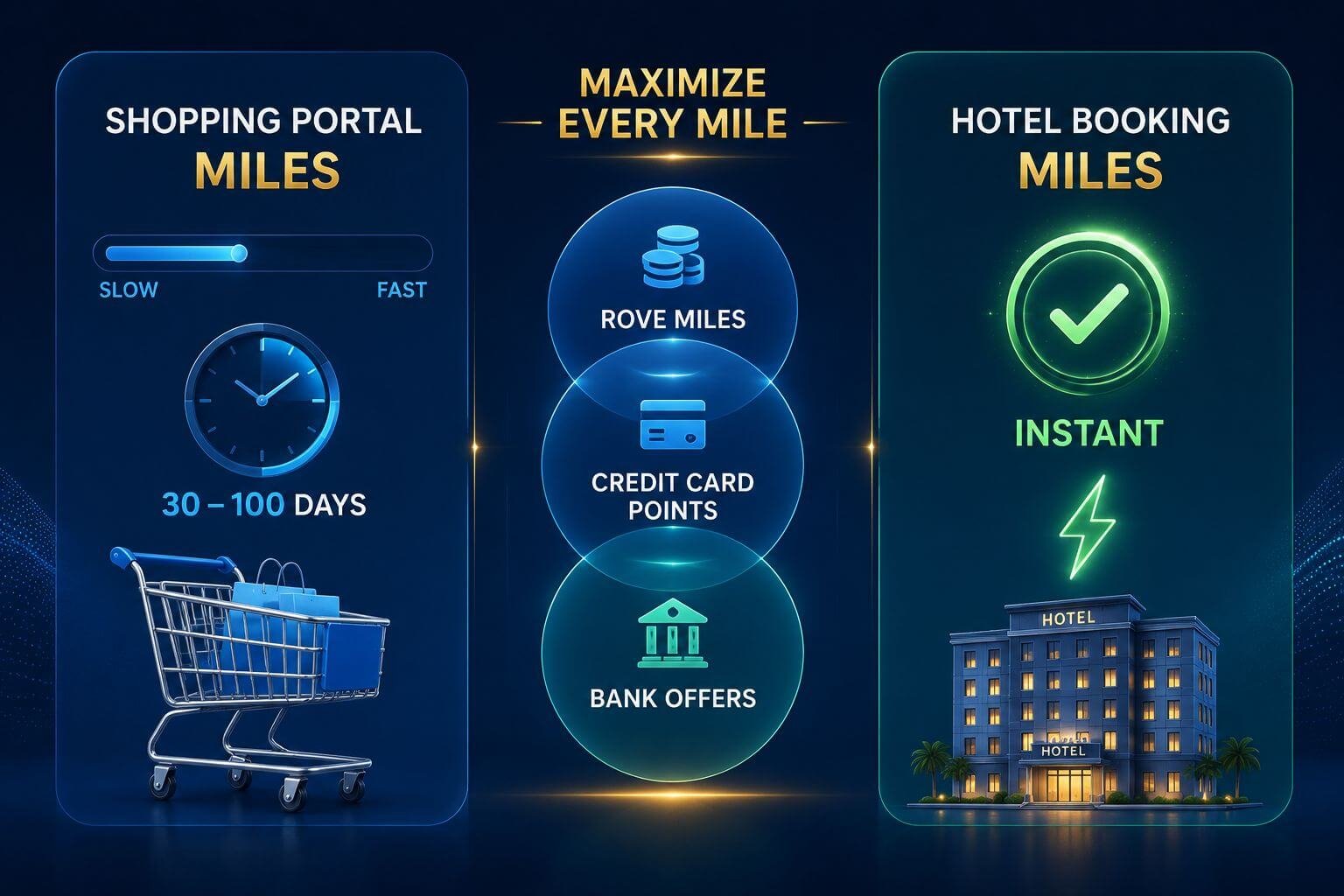
- Shopping miles post in 30–100 days. Hotel bookings made directly through Rove post instantly. These are two very different earning speeds.
- The triple-dip opportunity — Rove Miles + credit card points + issuer card offers — is real and requires almost no extra effort.
- Earning rates vary by merchant and change without advance notice. Always verify rates before a large purchase.
- Reddit users report genuine high-multiplier hotel finds (46x at one property in Vietnam, ~24x at a Palm Beach airport hotel), but also tracking failures and posting delays beyond the stated window.
- Shopping miles earned through the portal cannot be reliably timed to active transfer bonuses because of the 30–100 day posting lag.
- The extension is Chrome-only on desktop. Mobile shoppers must manually visit rove.com and click through — no app equivalent exists yet.
What the Rove Miles Shopping Portal and Chrome Extension Actually Do
Rove Miles is a travel and shopping portal that issues its own transferable currency — Rove Miles — which can be transferred to airline and hotel loyalty programs. The shopping portal functions similarly to Rakuten or the Capital One Shopping portal, but instead of cash back, you earn miles that transfer to travel partners.
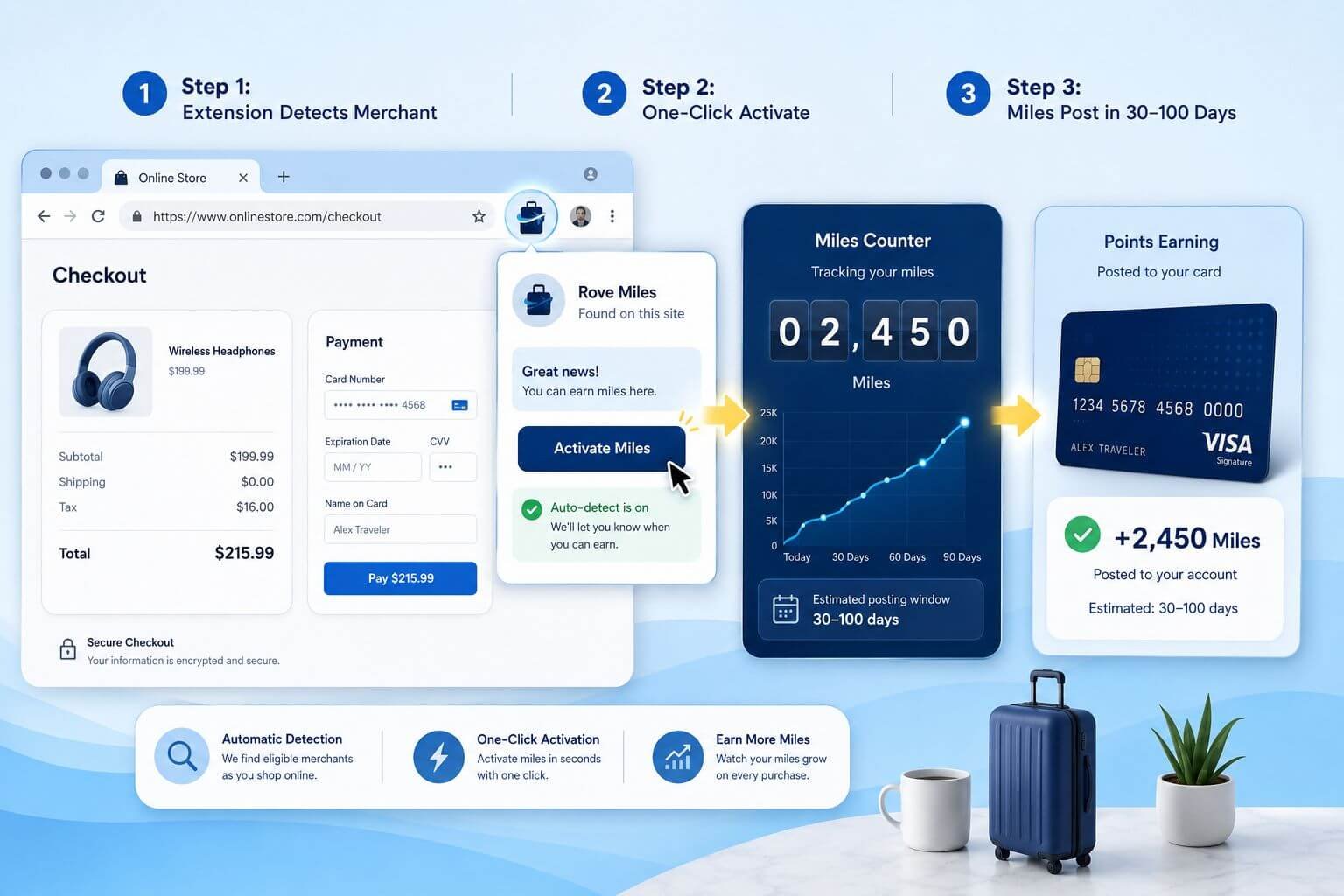
The portal covers 13,000+ partnered merchants as of 2026. Earning activities in one of two ways: you either visit rove.com and click through to a merchant from the portal page, or the Chrome extension detects an eligible merchant automatically when you browse and lets you activate with a single click.
What the Chrome extension actually does:
- Sits in your browser toolbar and monitors the sites you visit
- Displays a notification when you land on an eligible merchant’s site
- Activates earning with one click — no redirect required
- Surfaces available coupons at checkout automatically
- Does not require you to start your shopping session at rove.com
The extension is Chrome-only. There is no mobile app equivalent for the shopping portal. If you shop on a phone or tablet, you need to visit rove.com first and click through to the merchant manually — the automatic detection only works via the desktop extension.
Rove Miles is its own transferable currency, distinct from Amex points, Chase points, Capital One miles, Citi points, or Bilt points. You can transfer Rove Miles to select airline and hotel partners, which is what makes them useful for award travel rather than just a cash-back equivalent. For a full breakdown of Rove’s transfer partners and current earning rate tables, see the Rove Miles program overview at Award Travel Hub.
Step-by-Step: How to Activate and Earn on Every Purchase
The workflow is straightforward. Here’s how to set it up and use it consistently:
You may be interested



One-time setup:
- Create a free Rove Miles account at rove.com
- Install the Chrome extension from the Rove website (free, takes under two minutes)
- Sign into the extension with your Rove account credentials
- Keep the extension active in your regular Chrome profile
Per-purchase workflow:
- Begin shopping at any online merchant as you normally would
- Watch for the Rove icon to highlight or badge in your Chrome toolbar — this signals an eligible merchant
- Click the icon to activate earning (takes approximately two seconds)
- Complete your purchase normally using your preferred travel rewards credit card
- Wait 30–100 days for shopping miles to post to your Rove account
- Once posted, transfer to your chosen partner program or redeem directly through Rove
If you’re on mobile or not using the extension:
- Go to rove.com before starting your shopping session
- Search for your merchant in the portal directory
- Click through from the Rove portal page — this activates the tracking cookie
- Complete your purchase within the same browser session
Important: Do not clear cookies or switch browsers between clicking through from the portal and completing your purchase. Doing so breaks the tracking link and your miles will not post.
Current Earning Rates at Popular Merchants (Verified May 2026)
Earning rates fluctuate frequently and change without advance notice — this is standard across all shopping portals. The rates below were verified at rove.com in May 2026 and should be treated as a baseline, not a guarantee.
| Merchant | Rove Miles Rate (May 2026) | Notes |
|---|---|---|
| Nike | 6x per $1 | Excludes sale items at some thresholds |
| Gap | 5x per $1 | Includes Gap, Banana Republic, Old Navy |
| Hotels.com | 4x per $1 | Stacks with Hotels.com loyalty |
| Target | 2x per $1 | Rate lower than some competitors |
| Amazon | 1x per $1 | Among the lowest portal rates industry-wide |
| Walmart | 2x per $1 | Verify at time of purchase |
| Sephora | 5x per $1 | Beauty category tends to earn well |
| Expedia | 3x per $1 | Cross-check against Rove’s own hotel rates |
Rates verified May 2026 — subject to change without notice. Always confirm the current rate on rove.com before completing a large purchase.
Amazon and Target note: Both merchants consistently show low portal rates across most shopping portals, not just Rove. If you’re making a large Amazon purchase, the incremental Rove Miles may be minimal. For a $200 Amazon order at 1x, you’d earn 200 Rove Miles — worth checking, but not a strong reason to prioritize the portal.
For high-earning categories like apparel, beauty, and specialty retail, the rates are more compelling. A $300 Nike order at 6x yields 1,800 Rove Miles on top of whatever your credit card earns.
The Triple-Dip: Stacking Rove Miles With Your Credit Card and Bank Offers
This is where the Rove portal delivers its clearest value. A single online purchase can generate three separate streams of rewards simultaneously — and the Rove extension requires only one click to activate the third.
Concrete example — $300 purchase at a portal-eligible apparel retailer:
| Reward Layer | Calculation | Result |
|---|---|---|
| Rove Miles (5x rate) | $300 × 5 | 1,500 Rove Miles |
| Chase Sapphire Preferred (3x shopping) | $300 × 3 | 900 Chase Ultimate Rewards |
| Chase Offer (if active, e.g., 10% back) | $300 × 10% | $30 statement credit |
| Total value (estimated) | ~1,500 Rove Miles + 900 UR + $30 |
The 900 Chase Ultimate Rewards points are worth approximately $9–$18, depending on the redemption method. The 1,500 Rove Miles adds another transferable currency on top. Combined with the statement credit, a $300 purchase yields meaningful rewards in two flexible currencies with no additional spend.
This stacking logic applies equally if you use a Capital One Venture X (earning Capital One miles), an Amex card with an active Amex Offer, or a Citi card with a card-linked offer. The Rove portal layer is additive — it does not replace or interfere with your credit card’s earnings.
For readers building a broader points strategy, this kind of stacking is one component of a larger transferable points approach that includes Amex, Chase, Capital One, Citi, and Bilt programs.
One important constraint: Shopping miles earned through the Rove portal post in 30–100 days. If a transfer bonus to a Rove partner becomes available — say, a 25% bonus to Aeroplan — you almost certainly cannot time shopping miles to that window. The miles simply won’t be in your account in time. For context on how transfer bonus timing works across programs, see the stacking transfer bonuses guide.
Hotel bookings made directly through Rove are a different story. Those miles post instantly, which means a hotel booking through Rove can be transferred during an active bonus window. A $200 hotel booking at 5x earns 1,000 Rove Miles immediately — usable as soon as you need them. Compare that to a $200 electronics purchase at 5x, which also earns 1,000 Rove Miles but may not post for 10+ weeks.
The Real Downside: Posting Delays and Tracking Inconsistencies
This Rove Miles shopping portal Chrome extension review would be incomplete without addressing the two most consistent complaints from actual users: slow posting and unreliable tracking.
Posting delays:
The 30–100 day posting window is industry standard — Rakuten operates on a similar timeline. The issue is that some Rove users on r/rovemiles have reported miles posting beyond the stated window, in some cases more than 10 weeks after the expected date. This isn’t universal, but it’s frequent enough to set realistic expectations.
Shopping miles should be treated as a background accumulation tool, not a fast-earn mechanism. If you’re planning to transfer miles to a partner for a specific booking, do not count on recently earned shopping miles being available.
Tracking failures:
A meaningful subset of users report that the Chrome extension doesn’t reliably activate on every merchant visit. The extension may fail to detect an eligible merchant, or the tracking cookie may not register even after clicking the icon. This is the most common source of frustration in community discussions.
Mitigation steps that users report as helpful:
- Disable other shopping extensions (Capital One Shopping, Honey, etc.) temporarily before activating Rove, as competing extensions can interfere with tracking cookies
- Clear browser cache if the extension isn’t detecting a known eligible merchant
- Use the manual portal click-through as a backup when the extension fails to activate
- Screenshot or note your order confirmation number — Rove support reportedly responds to missing miles claims when you provide transaction evidence
Rove support: Community feedback describes Rove’s support team as responsive when issues are escalated. Missing miles claims are generally resolved, but the process takes time. The platform is still relatively new, and a December 2025 Reddit review characterized it as prioritizing user growth over operational polish — a fair description based on the tracking and posting issues reported since launch.
Rove Portal vs. Rakuten — Do You Need Both?
The short answer is yes, running both simultaneously is worth considering. Rove and Rakuten do not conflict with each other, and at merchants available in both portals, you can activate Rakuten cash back and Rove Miles on the same purchase.
The mechanics are the same: both use tracking cookies triggered by a click-through or extension activation. As long as the last click before purchase is attributed correctly, both can track the same transaction. In practice, some users report that having both extensions active simultaneously can cause attribution conflicts — the safer approach is to activate one extension, then the other, and verify both show as active before completing checkout.
The key distinction is currency type: Rakuten pays out as cash back (or Amex points if you’ve linked an eligible Amex card), while Rove pays in transferable Rove Miles. If you value transferable currencies for premium cabin redemptions over cash back, Rove’s output is more useful for award travel purposes. If you want simplicity, Rakuten’s cash back is immediately liquid.
Frame them as complementary tools, not competing ones. Rakuten for cash back or Amex point stacking, Rove for building a second transferable currency in parallel.
Final Verdict: Who Should Install the Rove Chrome Extension?
Install the Rove Chrome extension if:
- You shop online regularly at apparel, beauty, or specialty retail merchants where portal rates are 4x or higher
- You already use a travel rewards credit card and want to add a second transferable currency on the same purchases
- You’re comfortable with a 30–100 day wait for miles to post and won’t need those miles urgently
- You want to stack Rove Miles on top of Rakuten and card-linked offers for maximum per-dollar yield
- You’re interested in Rove’s hotel booking rates, where high-multiplier properties (community-reported finds include 46x at a Vietnam property) can generate significant miles instantly
Skip it or deprioritize it if:
- You primarily shop on mobile and won’t remember to click through the portal manually
- You’re building toward a specific award booking on a tight timeline and need miles available quickly
- Your shopping is concentrated at Amazon or Target, where portal rates are low enough that the incremental miles are minimal
- You find managing multiple browser extensions creates more friction than value
Best credit card pairings for the triple-dip:
Cards that earn bonus points in shopping or online retail categories maximize the second layer of the stack. The Chase Sapphire Preferred earns 3x on online grocery and select categories. The Capital One Venture X earns 2x on all purchases, making it a consistent baseline. For readers evaluating which card to pair with portal shopping, the best transferable points programs comparison and the best travel credit cards guide for 2026 are useful starting points.
For context on what Rove Miles are worth once they post and how to use them effectively, the Rove Miles Aeroplan transfer bonus guide and the Rove Miles to Virgin Atlantic overview show two of the stronger transfer partner options available in 2026.
Frequently Asked Questions
Does the Rove Chrome extension work on all websites? No. It only activates on merchants that have a partnership agreement with Rove. The extension will show a notification when you’re on an eligible merchant’s site and remain inactive otherwise.
Can I use the Rove portal on my phone? Yes, but not via the extension. Mobile shoppers must visit rove.com, find the merchant in the portal directory, and click through before completing a purchase. There is no Rove mobile app for shopping portal activation.
How long do Rove shopping miles take to post? Shopping miles post in 30–100 days, depending on the merchant’s commission confirmation window. Some users have reported delays beyond 100 days. Hotel bookings made through Rove post instantly.
Can I stack Rove and Rakuten on the same purchase? Yes, in most cases. Both portals use tracking cookies, and both can track the same transaction if activated correctly. Having both extensions active simultaneously may cause conflicts — activating them sequentially and verifying both show as active before checkout reduces that risk.
What happens if my Rove miles don’t post after 100 days? Contact Rove support with your order confirmation number and transaction details. Community reports indicate Rove’s support team is responsive to missing miles claims, though resolution takes additional time.
Are Rove Miles transferable like Chase or Amex points? Yes. Rove Miles are their own transferable currency that can be sent to select airline and hotel loyalty programs. They are not Chase Ultimate Rewards, Amex Membership Rewards, or Capital One miles — they are a separate program with their own transfer partners and ratios.
Can I time shopping miles to a transfer bonus window? Practically, no. The 30–100 day posting delay makes it nearly impossible to earn shopping miles and transfer them during a specific bonus window. Hotel booking miles, which post instantly, can be timed to active bonuses.
Does the Rove extension conflict with Capital One Shopping or Honey? Potentially. Multiple shopping extensions running simultaneously can interfere with tracking cookies. If you experience tracking failures, try disabling other shopping extensions before activating Rove.
What’s the best merchant category for Rove portal rates? Apparel, beauty, and specialty retail consistently show higher rates (4x–6x) than general merchandise retailers like Amazon (1x) or Target (2x). Always verify the current rate on rove.com before a large purchase, as rates change without notice.
Is Rove Miles the same program as Rove? The program underwent a rebrand from “Rove Miles” to “Rove” in early 2026. The underlying program, points balance, and transfer partners remain the same — the name change does not affect existing accounts or earned miles.
Conclusion
The Rove Miles shopping portal and Chrome extension are a legitimate addition to an online shopper’s rewards stack in 2026 — not a replacement for existing tools, but a complementary layer that adds a second transferable currency on purchases where you’re already earning credit card points.
The case for installing is straightforward: one click activates earning at 13,000+ merchants, the miles stack on top of whatever your credit card earns, and the extension is free. The case against is equally clear: tracking isn’t perfectly reliable, shopping miles take 30–100 days to post, and low rates at high-volume merchants like Amazon limit the upside for many shoppers.
Practical next steps:
- Install the Rove Chrome extension and verify it activates correctly at two or three merchants you shop regularly
- Identify which merchants in your shopping patterns offer 4x or higher rates — those are your priority activation targets
- If you’re also using Rakuten, test running both extensions on the same purchase to confirm attribution works correctly
- Treat shopping miles as a background accumulation tool, not a fast-earn mechanism for upcoming award bookings
- For hotel bookings, check Rove’s rates alongside your existing loyalty programs — community-reported high-multiplier properties can make Rove the better choice for specific stays
- Once miles accumulate, review active transfer partner options — the Rove to Aeroplan transfer bonus and Rove to Virgin Atlantic are two of the stronger redemption paths currently available
For readers building a broader points strategy, understanding how Rove Miles fit alongside your Amex points, Chase points, Capital One miles, and other transferable currencies is the key to getting full value from the portal. The best use of 100,000 points guide is a useful next read for thinking through how multiple currencies work together toward a specific redemption goal.


Content on Award Travel Hub is independently created by Award Travel Hub Editorial Desk and, where noted, reviewed by Award Travel Hub Review Desk. Some pages may contain affiliate links, but compensation does not determine our coverage, opinions, or methodology.