

Last updated: May 25, 2026
A single $25 purchase through an airline shopping portal can reset your mileage expiration clock by 12 to 24 months, protecting tens of thousands of miles from vanishing. Shopping portals and dining programs are the easiest way to keep points from expiring because they count as qualifying account activity for most major airline and hotel loyalty programs, and they require no flights, no hotel stays, and almost no effort.
Key Takeaways
- Most airline programs expire miles after 12–24 months of inactivity. Any qualifying earning or redemption activity resets the clock. Shopping portal purchases and dining program transactions almost always count.
- A purchase as small as $25 can protect a balance worth hundreds of dollars in future award redemptions.
- Major portals exist for Alaska, American, United, Delta, Southwest, JetBlue, and Flying Blue, plus hotel programs like Marriott and IHG.
- Flying Blue simplified its rules effective May 4, 2026: any earning activity (including portals) now extends all miles by 24 months.
- Aeroplan will reinstate a 18-month rolling expiration on November 30, 2026, making portal activity essential again for Air Canada loyalists.
- Dining programs from United, American, Delta, and others offer sign-up bonuses (often 1,000+ miles) that also reset expiration.
- Portal miles typically take 4–8 weeks to post, so don’t wait until the last week before expiration.
- Ad blockers and cookie conflicts are the most common reason portal purchases fail to track.
- Stacking portals with credit card offers is possible but requires understanding which combinations work and which create cookie conflicts.
- For a broader look at expiration rules across hotel programs, see the ATH guide on whether hotel points expire and how to extend them.
Why Are Shopping Portals the Easiest Way to Keep Miles Alive?
Shopping portals require the least effort among methods to generate qualifying activity on a loyalty account. You’re likely already buying things online; routing that purchase through a portal takes about 30 seconds and costs nothing extra.
Here’s why this matters:
- No travel required. You don’t need to book a flight or stay at a hotel.
- No minimum spend threshold for the activity to count (in most programs). Even a $10 purchase that earns 1 mile resets the clock.
- You earn bonus miles on top of your credit card rewards. A purchase through the United MileagePlus Shopping portal still earns your normal Chase points, Amex points, or whatever card you use.
- It works for programs you don’t fly often. Many intermediate points users have orphaned balances in programs like Alaska Mileage Plan or AAdvantage from past transfers or flights. Portals keep those balances alive without requiring loyalty to that airline.
The math is straightforward. If you have 30,000 Alaska miles (worth roughly $450 at 1.5 cents per point) and they’re about to expire, a $25 portal purchase that earns 50 miles resets the 24-month clock. That’s $25 spent to protect $450 in value. To understand how to calculate that value accurately, check the ATH guide to cents-per-point math.
Which Major Airline and Hotel Portals Should You Know in 2026?
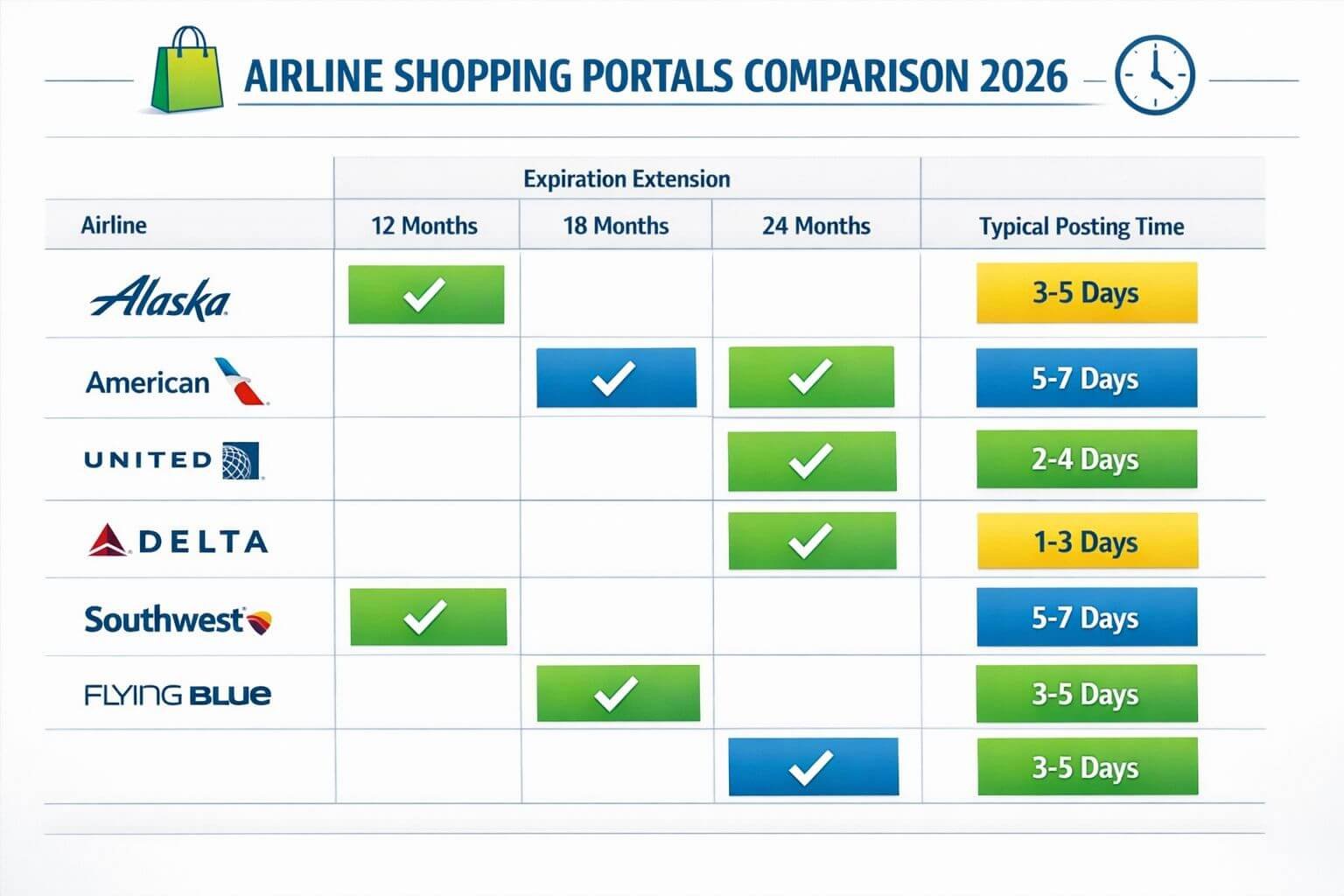
The table below covers the most relevant U.S. airline shopping portals, their expiration policies, and how long portal-earned miles typically take to post.
| Program | Portal Name | Expiration Policy | Portal Activity Resets Clock? | Typical Posting Time |
|---|---|---|---|---|
| Alaska Mileage Plan | Alaska Airlines Shopping | 24 months of inactivity | Yes | 4–6 weeks |
| American AAdvantage | AAdvantage eShopping | 24 months of inactivity | Yes | 4–8 weeks |
| United MileagePlus | MileagePlus Shopping | 18 months of inactivity | Yes | 4–6 weeks |
| Delta SkyMiles | SkyMiles Shopping | No expiration | N/A (miles don’t expire) | 6–8 weeks |
| Southwest Rapid Rewards | Rapid Rewards Shopping | 24 months of inactivity | Yes | 4–6 weeks |
| JetBlue TrueBlue | TrueBlue Shopping | 24 months of inactivity | Yes | 4–8 weeks |
| Flying Blue (AF/KLM) | Flying Blue Shopping | 24 months of inactivity (effective May 4, 2026) | Yes | 6–8 weeks |
| Aeroplan (Air Canada) | Aeroplan eStore | 18-month rolling expiration (reinstated Nov 30, 2026) | Yes | 4–8 weeks |
Hotel and bank-linked portals worth noting:
- Marriott Bonvoy Shopping — Marriott points don’t currently expire with account activity, and portal purchases count. See the full Marriott Bonvoy guide for details.
- IHG Rewards Shopping — IHG points expire after 12 months of inactivity; portal purchases reset the clock.
- Rakuten — Not airline-specific, but can be linked to Amex Membership Rewards to earn Amex points on purchases. This doesn’t help with airline-specific expiration but builds your transferable points balance.
Key update for 2026: Flying Blue’s May 4, 2026, policy change is significant. Previously, miles earned from partners had a different expiration treatment than flight-earned miles. Now any eligible activity, including a single portal purchase, extends your entire balance by 24 months. If you hold Flying Blue miles from a past Amex points or Bilt points transfer, a quick portal purchase protects them all.
Common mistake: Assuming Delta SkyMiles need portal activity to stay alive. Delta miles don’t expire, so the SkyMiles Shopping portal is purely an earning tool, not an expiration hedge.
Step-by-Step: Making a Purchase That Resets Your Expiration
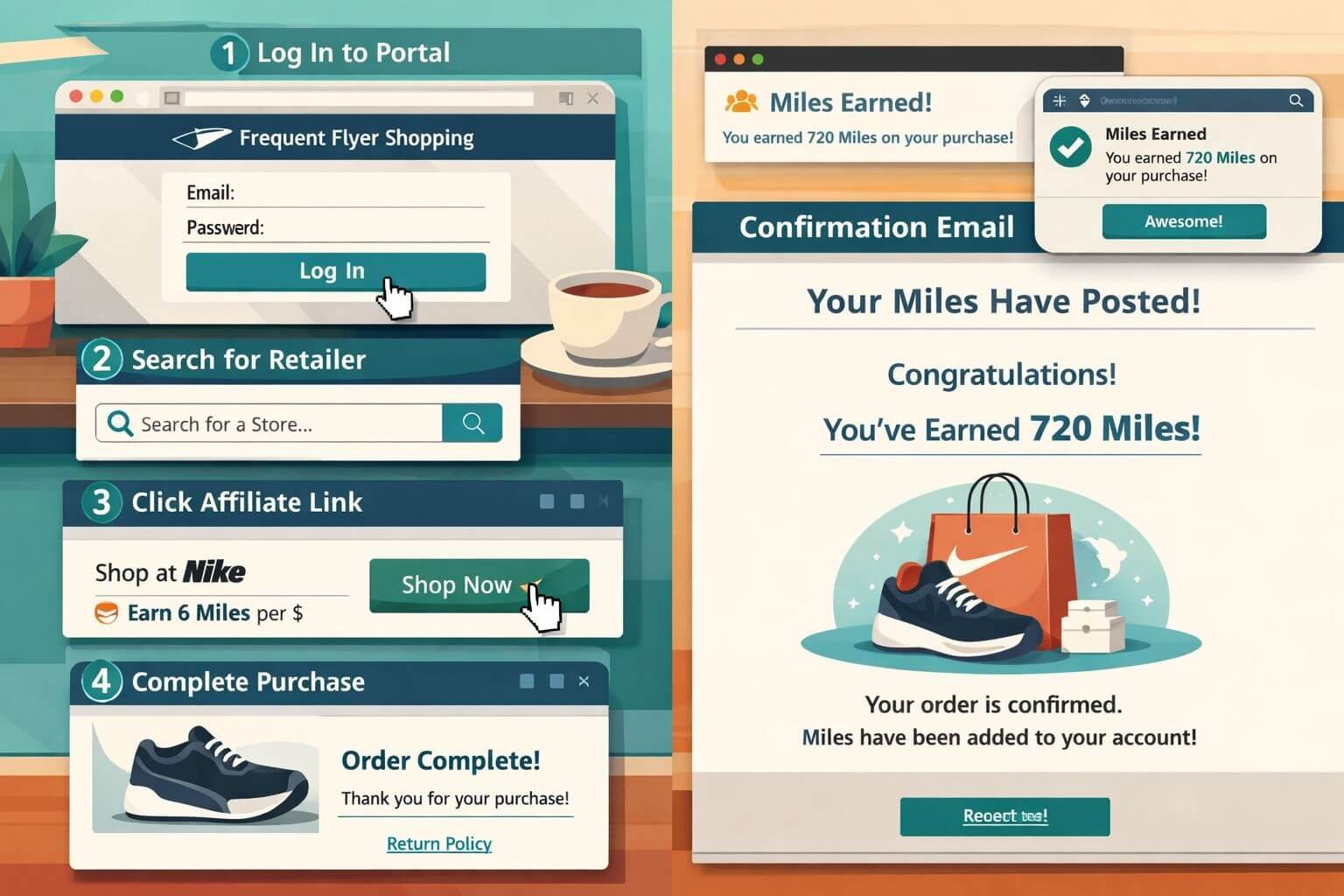
Here’s the exact process, from start to confirmation. Shopping portals and dining programs are the easiest ways to keep points from expiring, but only if the purchase is tracked correctly.
Before you shop
- Check your expiration date. Log into your loyalty account and find the expiration notice. Some programs (like AAdvantage) show it on the account dashboard. Others require checking terms or contacting support.
- Allow 6–8 weeks for posting. If miles expire on June 1, make the portal purchase by early April at the latest.
- Disable ad blockers on the portal site and the retailer’s site. Extensions like uBlock Origin, Privacy Badger, and even some antivirus browser plugins can strip tracking cookies that the portal needs to credit your purchase.
- Clear cookies or use a fresh browser window. If you’ve recently visited the retailer’s site directly, existing cookies may override the portal’s tracking cookie.
Making the purchase
- Log into the airline shopping portal (e.g., mileageplusshopping.com for United).
- Search for a retailer where you’d normally shop. Common options with reliable tracking: Nike, Macy’s, Walmart, Best Buy, Home Depot, Sephora.
- Click the “Shop Now” or “Earn Miles” button on the portal. This opens the retailer’s site with the portal’s affiliate tracking cookie attached.
- Complete your purchase in the same browser session. Don’t close the tab, switch browsers, or apply coupon codes from other sites (this can overwrite the tracking cookie).
- Save your order confirmation email and take a screenshot of the portal’s confirmation page if one appears.
After the purchase
- Check the portal’s “My Activity” or “Order History” section within 48 hours. Most portals show pending transactions.
- Wait 4–8 weeks for miles to post to your loyalty account.
- Verify the expiration date has been updated in your loyalty account once miles appear.
Real-world example: Protecting 25,000 Alaska miles
Scenario: You transferred 25,000 Bilt points to Alaska Mileage Plan for a future trip, but plans changed. The miles will expire in 8 weeks.
- You log into the Alaska Airlines Shopping portal and find Nike offering 3 miles per dollar.
- You buy a $30 pair of socks. Total miles earned: 90.
- Cost: $30 out of pocket. Miles posted: 5 weeks later.
- Result: Your 25,000-mile balance (plus 90 new miles) now has a fresh 24-month expiration window.
- Value preserved: At 1.5 CPP, those 25,000 miles are worth roughly $375 in award travel. That’s a 12.5x return on your $30 purchase.
Second example: Saving 40,000 AAdvantage miles
Scenario: You have 40,000 AAdvantage miles from a Citi points transfer that’s 22 months old. Expiration is in 2 months.
- You log into AAdvantage eShopping and buy a $50 item from Macy’s at 2 miles per dollar (100 miles earned).
- Miles post in 6 weeks. Expiration resets to 24 months from the posting date.
- Value preserved: At 1.4 CPP, 40,000 AAdvantage miles are worth roughly $560.
You may be interested



If you’re planning to use those AAdvantage miles for a Premium Cabin redemption, the guide to booking business class with points covers the best partner airline sweet spots.
How Do Dining Programs Work to Reset Miles Expiration?
Dining programs function the same way as shopping portals for expiration purposes: they generate qualifying earning activity on your loyalty account.
How to enroll:
- Visit the airline’s dining program site (e.g., mileageplusdining.com, aadvantagedining.com).
- Register your credit or debit card.
- Dine at a participating restaurant and pay with that registered card.
- Miles post automatically, typically within 4–8 weeks.
Current sign-up bonuses (as of early 2026):
- United MileagePlus Dining: 3,000 bonus miles for new members who spend $25 at a participating restaurant and write a review.
- Delta SkyMiles Dining: 1,000 bonus miles for new members who spend $30 at a participating restaurant (extended through March 31, 2026).
- AAdvantage Dining: Periodic bonuses of 500–1,000 miles for new members.
Best for: Travelers who eat out regularly and want a completely passive way to keep miles alive. Register your card once, and every qualifying restaurant visit earns miles automatically.
Not for: People who rarely dine out or who only eat at restaurants not in the network. Check the dining program’s restaurant locator before signing up.
For more on maximizing dining rewards specifically through Bilt, see the ATH guide on earning more on Rent Day with Bilt dining rewards.
How to Stack Portals, Card Offers, and Cashback
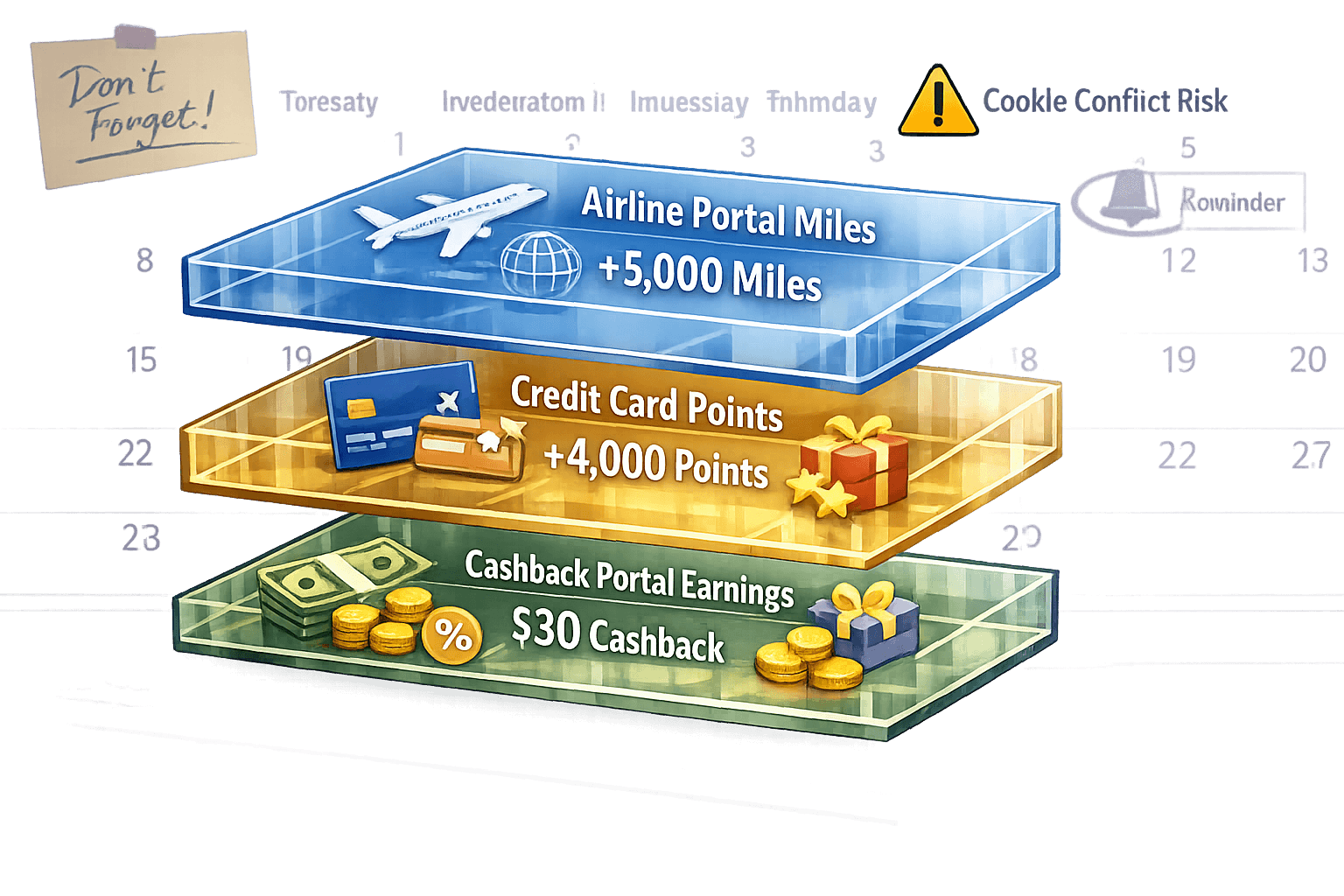
Stacking means earning from multiple sources on the same purchase. Done correctly, a single transaction can earn airline portal miles, credit card points, and sometimes additional cashback.
What stacks cleanly:
- Airline portal miles + credit card points. This always works. The portal earns airline miles; your credit card earns its normal rewards. A $100 purchase at 3 miles/dollar through the United portal, paid with a Chase Sapphire Preferred (2x on general purchases), earns 300 United miles AND 200 Chase points.
- Airline portal miles + Amex Offers / Chase Offers. Card-linked offers (the ones that appear in your Amex or Chase app) stack with portal miles because they’re tied to the card, not a cookie.
- Dining program miles + credit card points. Same principle. The dining program credits airline miles; your card earns its own rewards.
What creates conflicts:
- Airline portal + Rakuten (or another cashback portal). You can only click through one portal per transaction. The last cookie wins. If you click through Rakuten and then the airline portal (or vice versa), only one will track.
- Coupon extension browser add-ons (Honey, Capital One Shopping, etc.) can inject affiliate cookies that override your portal’s tracking. Disable these before portal purchases.
Decision rule: If your primary goal is keeping airline miles alive, always prioritize the airline portal over cashback portals. The value of protecting an existing balance almost always exceeds the few percent cashback you’d earn from Rakuten.
For a broader comparison of cashback portals versus airline miles earning, the ATH article on cashback portals vs. miles breaks down when each approach makes sense.
What If Portal Miles Don’t Post in Time?
This is the most stressful scenario: you made a portal purchase, but miles haven’t posted and expiration is approaching.
Steps to take:
- File a missing miles claim through the portal’s website. Most portals have a “Missing Miles” or “Where Are My Miles?” form. You’ll need your order confirmation number and purchase date.
- Contact the airline’s loyalty program directly. Explain the situation and provide proof of the portal purchase. Some agents can manually extend the expiration window while the claim is investigated.
- Make a second qualifying activity as a backup. If the portal purchase is stuck, a dining program transaction or even a small mile purchase (most programs sell miles in small increments) can serve as a safety net.
- Check the portal’s FAQ for excluded items. Gift cards, marketplace third-party sellers, and items purchased with store credit often don’t earn portal miles. If your purchase falls into one of these categories, it won’t be tracked regardless of cookies.
Common tracking failures:
- Ad blocker was active during the purchase
- Coupon browser extension overwrote the portal cookie
- Purchase was made on a mobile app instead of the mobile browser (most portals don’t track in-app purchases)
- Item was returned or order was canceled before miles posted
Edge case: If your miles expire before you can resolve a tracking issue, some programs (notably Alaska and American) have offered courtesy extensions when you can demonstrate a good-faith attempt at activity. This isn’t guaranteed, but it’s worth a polite phone call.
How Do You Build Ongoing Habits So Miles Never Expire Again?
Shopping portals and dining programs are the easiest way to keep points from expiring, but only if you remember to use them. Here’s a system:
Set calendar reminders. For each loyalty program with an activity-based expiration, set a recurring reminder 3 months before the expiration date. This gives you plenty of buffer for posting delays.
Install browser extensions. Tools like the AAdvantage eShopping button or MileagePlus Shopping browser extension automatically alert you when you’re on a retailer’s site that participates in the portal. This removes the need to remember to visit the portal first.
Register all your cards with dining programs. Even if you don’t dine out often, having a card registered means any qualifying restaurant visit automatically earns miles. It’s a set-and-forget safety net.
Consolidate where possible. If you have small balances across multiple programs, consider whether it’s worth maintaining all of them. Sometimes it’s better to let a tiny balance expire rather than tracking five different expiration dates. Focus your portal activity on programs with meaningful balances or active travel plans.
Consider transferable points as your primary strategy. Amex points, Chase points, Capital One miles, Citi points, and Bilt points don’t expire as long as your account is open and in good standing. Keeping your balance in transferable currencies and only transferring when you’re ready to book eliminates expiration risk entirely. The ATH comparison of transfer partners across major banks can help you decide where to hold your points.
For a complete annual review process, the end-of-year points and miles reset checklist covers expiration dates, program changes, and action items.
Frequently Asked Questions
Does a shopping portal purchase definitely count as a qualifying activity? Yes, for all major U.S. airline programs with activity-based expiration (Alaska, American, United, Southwest, JetBlue). The miles earned through the portal are treated the same as any other earning activity. Flying Blue confirmed this explicitly in its May 2026 policy update.
How small can the purchase be? There’s no minimum purchase amount for the activity to count in most programs. Even a $5 purchase that earns 5 miles resets the clock. That said, some portal promotions require a minimum spend threshold to earn bonus miles.
Do Delta SkyMiles expire? No. Delta SkyMiles do not expire regardless of account activity. You don’t need to use the SkyMiles Shopping portal or dining program to protect your balance.
Will Aeroplan miles start expiring again? Yes. Aeroplan plans to reinstate an 18-month rolling expiration on November 30, 2026. If you hold Aeroplan miles, start generating qualifying activity before that date.
Can I use a shopping portal on my phone? Yes, but use the mobile browser, not the retailer’s app. Most portal tracking relies on browser cookies, which don’t carry over into native apps. Some portals have their own apps with built-in tracking, but browser-based purchases are more reliable.
How long do portal miles take to post? Typically 4–8 weeks after the purchase ships (not after the order is placed). Some portals are faster; others can take up to 12 weeks during peak shopping seasons.
Can I earn airline miles through a portal AND cashback through Rakuten? Not on the same transaction. You must choose one portal per purchase. The last affiliate cookie applied to your session determines which portal gets credit.
Do dining program miles also reset expiration? Yes. Dining program earnings are treated as a qualifying activity in the same way as portal purchases, flight miles, or partner transactions.
What if I have miles in a program I’ll never fly again? Consider whether the balance is large enough to be useful for a partner airline redemption. Many programs let you book flights on alliance partners. If the balance is very small (under 5,000 miles), it may not be worth the effort to maintain. For ideas on using points across partner airlines, see the ATH guide on booking award flights with flexible points.
Are there any programs where portal activity does NOT reset expiration? Programs without activity-based expiration (like Delta) don’t need it. For programs that use calendar-based expiration (some international carriers), portal activity may not help. Always verify the specific program’s rules.
Conclusion
Shopping portals and dining programs require almost no effort and no travel, yet they’re the single most reliable way to prevent airline miles from expiring. The strategy is simple: route a purchase you’d make anyway through the right portal, or dine at a participating restaurant with a registered card, and your entire mileage balance gets a fresh 12- to 24-month lease on life.
Your next steps:
- Check expiration dates for every airline loyalty program where you hold miles. Prioritize any balance expiring within 6 months.
- Make one portal purchase for each at-risk program. A $25–$50 purchase at a retailer you’d normally use is enough.
- Register a credit card with the dining programs for your most important airline accounts.
- Set calendar reminders 3 months before each expiration date going forward.
- Consider holding points in transferable currencies (Amex, Chase, Capital One, Citi, Bilt) to avoid expiration risk entirely. When you’re ready to book, transfer to the airline program and redeem immediately.
The best time to protect your miles is well before they’re at risk. A few minutes of setup now can save hundreds of dollars in future award travel.


Content on Award Travel Hub is independently created by Award Travel Hub Editorial Desk and, where noted, reviewed by Award Travel Hub Review Desk. Some pages may contain affiliate links, but compensation does not determine our coverage, opinions, or methodology.